Nokia New Lumia 830 Power On Off Button Ways Problem Jumper Hardware Solution
Nokia Lumia 830 Power On Off Button Ways Problem Jumper Here’s a
solution for Nokia Lumia 830 with End/Power on off key that doesn’t work
problem. This solution provide a simple step by step instruction on how
to fix this problem.
If the device shows charging indications
when the battery charger is being plug-in but doesn’t Turns On when the
power key is pressed. The problem may possibly lies on a faulty flex
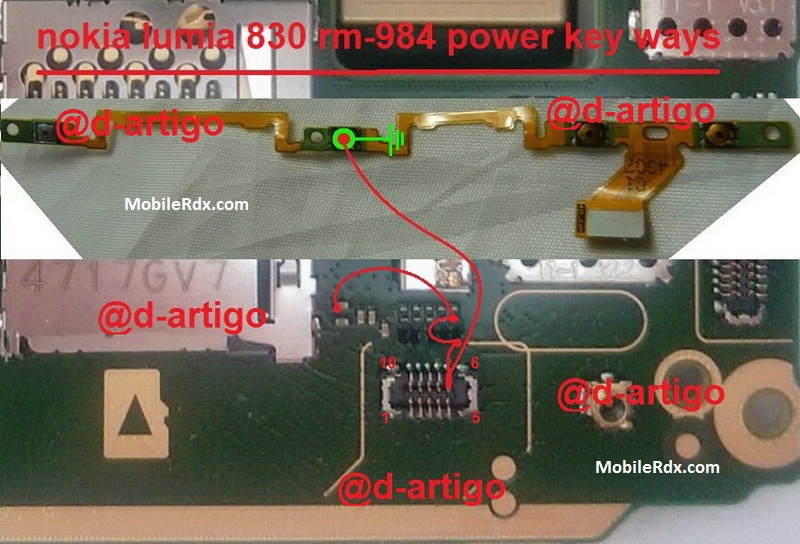
ribbon cable. Refer to the solution below for it shows the connection
line paths of the Nokia 830 power key, which can be useful to trace the
line paths for easy troubleshooting or repair.
In
troubleshooting the End/Power On Off key problem, you may first check
the keypad flex assembly for possible damaged or try to replace it with a
new replacement spare. If the Flex ribbon cable seems good and or
already tried replacing it but it doesn’t solved the problem, check the
connection line paths of the power on off key from the flex pin
connector down to the resistor
If you have further questions please don’t hesitate to leave a comment.
Note:
Every repairing solution posted here is tested by at least one member
of our team. Use the information available here at Your Own Risk. We are
not responsible if any harm comes to your device during the repairing
process.
Nokia 830 Power Button,Power Key Ways,Power Switch,On Off Button, On Off Switch, Power Problem
can you tell me how to renove/replace the power/volume/camera on/off flex cable please?
ReplyDeleteCheers.